
To respond to a customer webchat, the chat must be in your inbox and set to active. Once you activate a webchat, your status updates to Handling a chat, and the Active Item Dialogue displays the tools you need to manage the conversation. These include options to insert templates, type and send responses, and assign a contact to the chat.
If needed, you can park an active webchat. Parking temporarily pauses the chat in your inbox so it can be activated again later. This allows you to retain ownership of the conversation without being marked as actively working on it. You may choose to park a webchat if you are switching between items or plan to return to the chat at a later time.
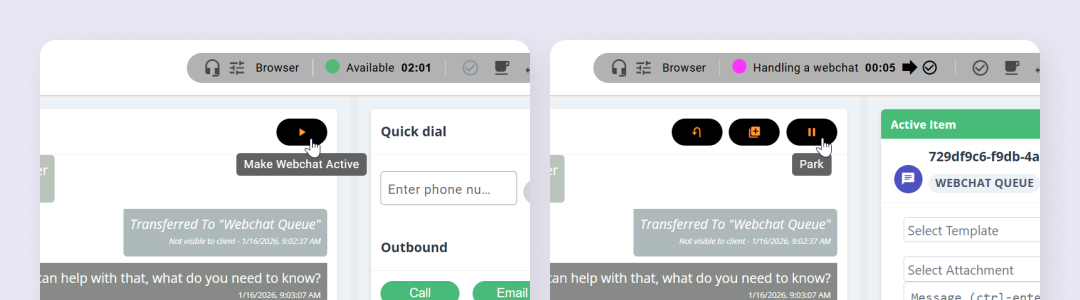
Activating and Parking a Webchat is done by clicking the relevant icons at the top of the chat area:
Park Behaviours #
- A webchat can be parked while it is in progress or during the wrap‑up stage. If you park a chat during wrap‑up, the wrap‑up timer is also paused. When you reactivate the chat, the wrap‑up period resumes from where it left off.
- If all of your webchats are parked, the system may automatically present a new incoming webchat to you, depending on your configuration and availability.
- If you are interrupted by a phone call while handling a webchat, your active webchat is parked automatically and remains in your inbox, ready to be activated again later. If the customer ends the chat while you are on the call, the webchat is placed into a parked wrap‑up state. Once the call ends, the webchat automatically resumes and moves into an active wrap‑up state so you can complete any required wrap‑up actions.